Imagine hiring a personal assistant who is a world-class expert in financial analysis. They're brilliant with spreadsheets and market trends, but when you ask them to draft a creative marketing email or proofread a technical document, they struggle. You wouldn't fire them - you'd just wish you had a team of specialists to call on for diffrent tasks.
The world of AI coding assistants works much the same way. Different large language models, the "brains" behind the AI, possess unique strengths. Some are exceptional at code generation, others excel at creative problem-solving, and some have special abilities like analyzing images.
At Embedr, our core philosophy is built on user choice. You shouldnt be locked into a single AI model that's a jack-of-all-trades but a master of none. This post will show you exactly how to take control and switch the "brain" of your AI assistant to perfectly match the task at hand.
What "Model-Agnostic" Really Means for You
Freedom from AI Lock-In
Being "model-agnostic" is a simple but powerful concept: it means Embedr is designed from the ground up to work with multiple AI providers. We don't force you into a walled garden. The primary benefit for you, the developer, is that you are always in control. You get to choose the best tool for the job without being tied to a single company's technology roadmap.
Model-agnostic: Use your preferred AI model. Integrates with multiple providers.
The "Per-Chat" Switch: Picking the Right Brain for the Moment
How to Select a Model for a Single Chat
Sometimes, you need a specialist for a one-off task. Imagine you've just used our "Bring Your Own Datasheet" feature to import the PDF for a new sensor. Now, you need to verify your physical prototype. Instead of just describing your setup, you can switch to an image-capable model, attach a photo of your breadboard, and ask, "Based on the datasheet I uploaded and this photo, have I wired the I2C pins correctly?" This is where switching models on a per-chat basis becomes incredibley powerful.
Here's how to do it:
- In the Embedr Agent panel, start a new conversation by clicking New Chat.
- Before typing your message, locate the model selector dropdown menu at the top of the chat interface.
- Click the dropdown to reveal the list of available AI models.
- Select the specialist model you need for this specific task (e.g., a model with image-analysis capabilities). The chat will now use this model for the entire conversation thread.
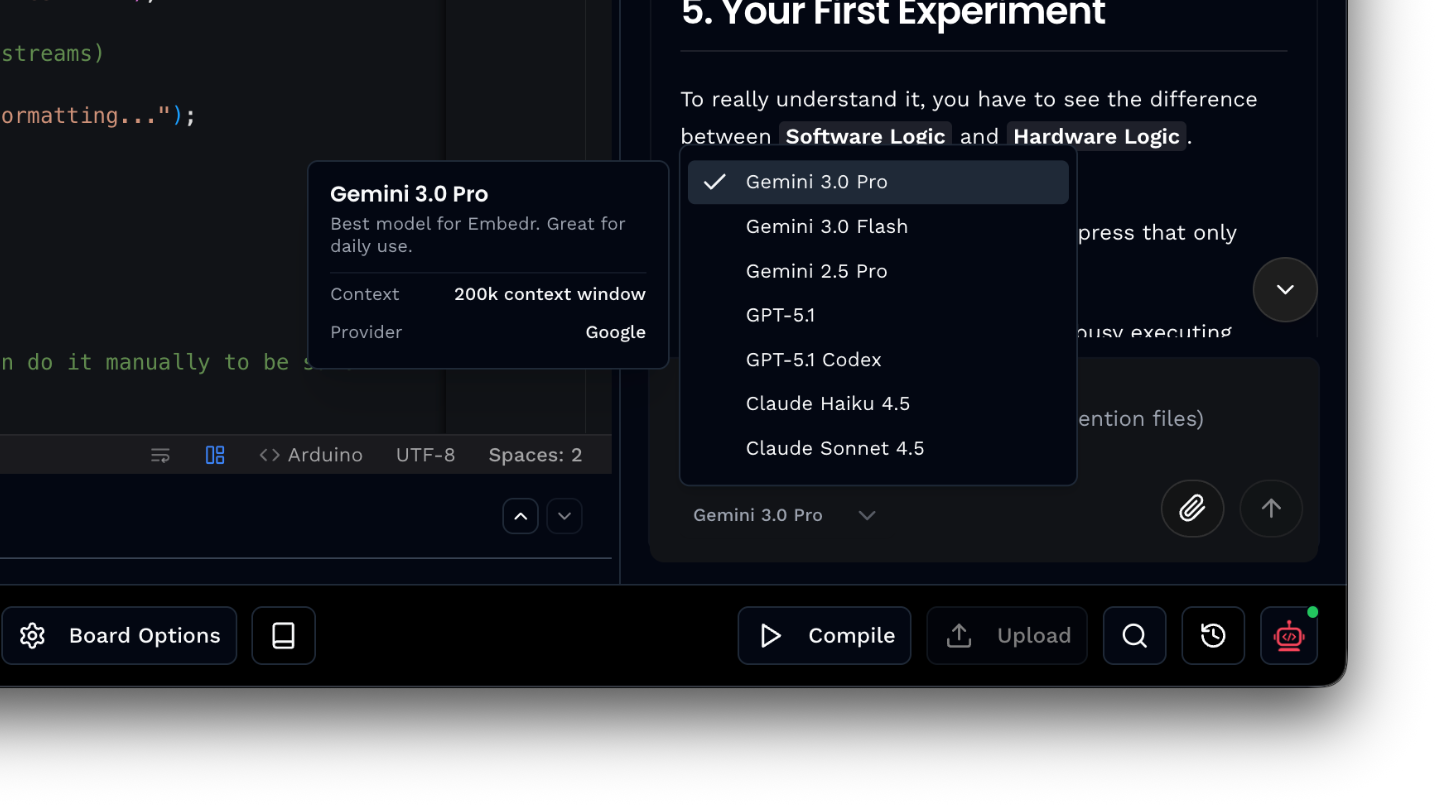
This feature allows you to adapt on the fly, ensuring you're always using the most effective AI for the immediate job. The model you select will persist throughout that particular conversation, so you can have multiple chats running with different models depending on what you're working on.
You're the Architect of Your AI Experience
The ability to choose your AI model isn't just a feature - its a fundamental shift in how you interact with your tools. Embedr empowers you to move beyond a one-size-fits-all approach and become the architect of your own AI-assisted development experience. By matching the right "brain" to the right task, you unlock new levels of efficiency and creativity.
Now that you can switch brains on the fly, what new workflows will you build?
Want to try Embedr? Download it here - it's free.